Why this happens
Some manufacturers (Samsung, Xiaomi, Oppo and others) add their own battery management system, on top of Android's. This system pauses apps running in the background — even ones that need to monitor your calls constantly, like Egidio. The result: after a few hours or a restart, protection seems "turned off" even though you never switched it off yourself.
The fix in 3 taps
Open Egidio, go to Settings, tap Diagnostic. If the battery line shows an issue, tap it: it opens Egidio's page directly in your phone's settings.
On that page, tap Battery.
Choose Unrestricted. Depending on the brand, this option may also be called "No restrictions" or "Allow background activity".
The exact wording for your brand
Manufacturers use different words for the same setting — and a different interface too. Look for this one in Egidio's battery page:
Egidio recognizes your brand automatically
The Diagnostic → Battery button never sends you to a generic screen. It opens the app's page directly in your phone's own settings — One UI on Samsung, MIUI or HyperOS on Xiaomi, ColorOS on Oppo/Realme/OnePlus, Funtouch or OriginOS on Vivo, EMUI or MagicOS on Huawei and Honor. You never have to hunt for this setting yourself in an unfamiliar menu — Egidio takes you straight there, whatever your brand.
The proof, on a real phone
These are Android's own App Info screens (Settings → Apps → Egidio) — not a manufacturer-specific tool, so this view works the same way on any Android phone, whatever the brand:
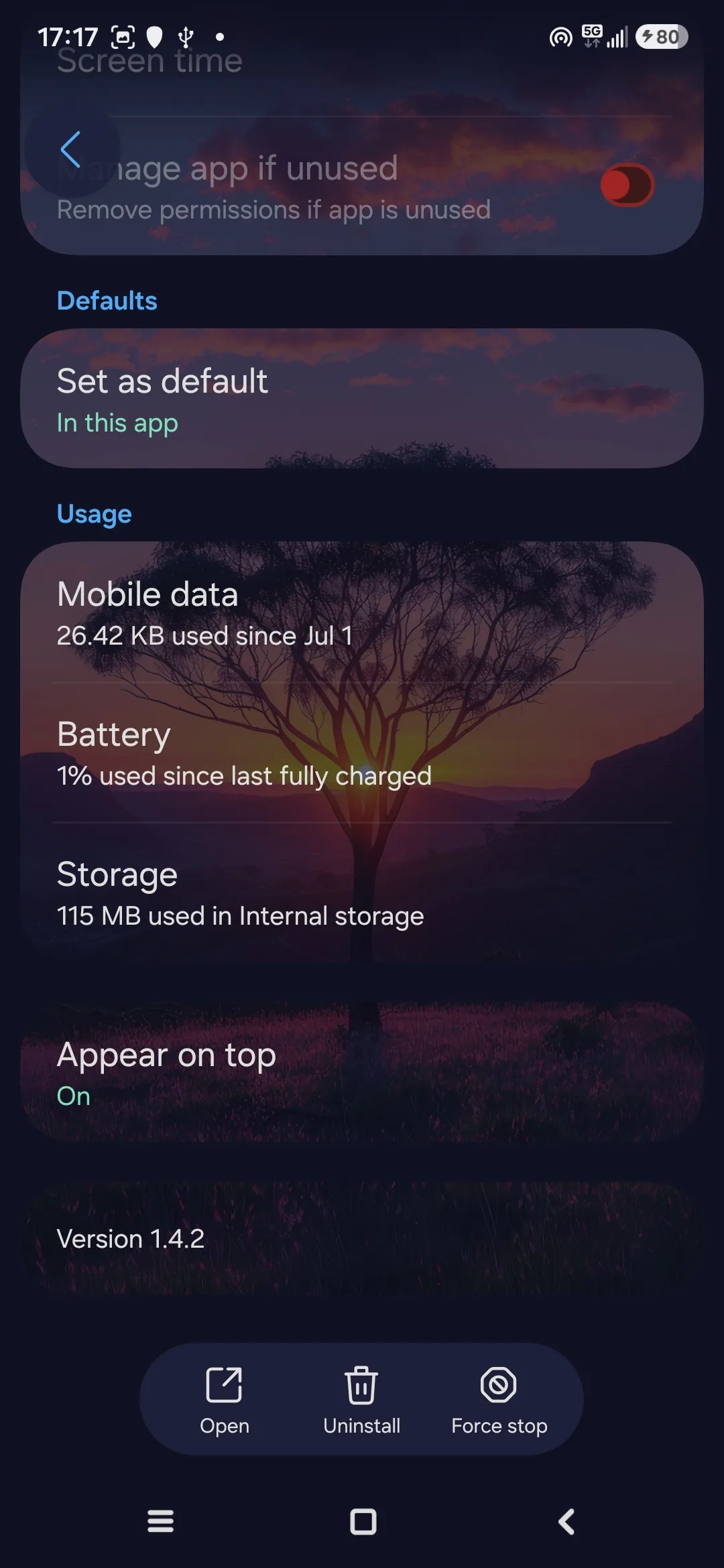
Battery: 1% used since the last full charge
Taken on a Samsung Galaxy S24, July 13, 2026. "1% used since last full charge" is Android's own measurement across an entire charge cycle — not a single day — while Egidio kept monitoring in the background the whole time. The screen also confirms exactly what Egidio can access: contacts and accounts, and notifications — nothing more.
Why some brands restrict background apps more aggressively than others: see dontkillmyapp.com, a community-run project by developers tracking the most restrictive battery management behavior on Android, brand by brand.
How to check it's set correctly
Go back to Egidio → Settings → Diagnostic. The battery line should turn green. If it stays red after following the steps, restart your phone once — some manufacturers only apply the change after a restart.
Frequently asked questions
Why does protection turn itself off?
Some brands (Samsung, Xiaomi, Oppo, Realme, OnePlus, Vivo, Huawei, Honor) automatically stop background apps to save battery. Without this setting, Egidio is paused.
How do I stop Samsung from putting Egidio to sleep?
Egidio's settings → Battery → "Unrestricted". This is the most important setting for reliable protection.
Does this battery setting share any data?
No. It only stops your phone from stopping Egidio in the background.
Does this affect every phone?
No, only certain brands: Samsung, Xiaomi, Redmi, Poco, Oppo, Realme, OnePlus, Vivo, Huawei and Honor.
Does Egidio use a lot of battery?
On a real Samsung Galaxy S24, Android's own App Info screen showed just 1% battery used since the last full charge, while Egidio kept monitoring in the background the whole time. This is one real example on one device, not a guaranteed average for every phone.